
Alien Studio for Mac

Less clutter.
More headroom.

Small utilities for the things that interrupt your day. Betas are coming soon.

Apple silicon · macOS 13 or later

Meet the utilities

A clear job for each app.

Beta coming soon

Notification Sweeper

A calmer desktop, one clear at a time.

Clear persistent notification clutter with explicit controls, pause and snooze.

  • Clear visible notification clutter when you choose.
  • Pause or snooze reminders to tidy up.
  • Choose the notification threshold that suits your day.

Accessibility permission is required to inspect and dismiss notifications.

Check beta availability
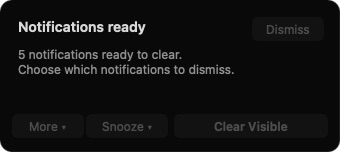
Notification Sweeper preview with Clear Visible, Snooze, More and Dismiss controls
Development preview · sample notification count; controls disabled. The beta may look different.
Beta coming soon

Usage Guardian

Know your usage before you hit a limit.

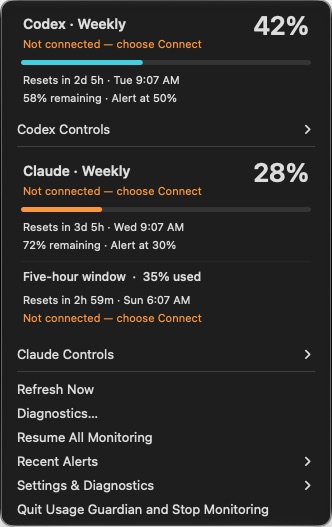
Keep an eye on Codex and Claude subscription limits from your menu bar, with alerts at the thresholds you choose.

  • See Codex and Claude subscription usage in your menu bar.
  • Choose thresholds for local usage alerts.
  • Connect the providers you use; quit to stop monitoring.

Requires an existing Codex or Claude Code sign-in. Allow notifications for alerts.

Check beta availability
Usage Guardian menu showing sample Codex and Claude usage, reset times and alert thresholds
Development preview · sample usage values; providers disconnected. The beta may look different.
Beta coming soon

ReadyJot

A little space to think, always close by.

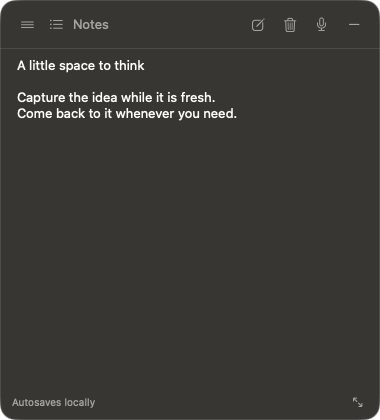
Keep a note close at hand in a small floating pill that opens into an autosaving editor.

  • Open a floating note from a compact pill and keep it above ordinary windows.
  • Write, search and organize notes that save locally as you work.
  • Transcription and optional Apple Notes sync are planned for the beta.

Transcription requests microphone and speech recognition access. Optional Apple Notes sync requests Automation access.

Check beta availability
ReadyJot note editor containing a short sample note
Development preview · sample note; beta in development. The beta may look different.

Fits your routine

You stay in control.

At home in the menu bar

Small utilities that stay close without taking over your workspace.

Choose what connects

Usage Guardian starts with providers disconnected. You choose which existing logins to connect.

Clear setup instructions

Find compatibility, permissions and installation steps together on the Downloads page.